 RAW Supersampler
80–89% smaller at 4K2
Measured on 50 Nikon ZR 6K R3D-NE clips, depending on the profile. Full numbers are in the table below.
A converter for Nikon R3D-NE and NEV. It scales 8K or 6K raw down to 6K, 4K or Proxy raw from the full sensor, without cropping or debayering. The result opens in the same raw workflow as your camera files.
Free to try. Download it free and convert your own clips with all settings. The output carries a watermark until you unlock the full version with a one-time purchase in the app.
 RAW
RAWMeasured on 50 Nikon ZR 6K R3D-NE clips, depending on the profile. Full numbers are in the table below.
Hardware-accelerated on Apple silicon. Speed depends on the source, output resolution and profile.
Keep the source container, or convert R3D-NE to NEV and back.
Recursive search keeps your folder structure. Archive mode copies other files and verifies the result.
Nikon cameras record raw at a high resolution and a constant bitrate, which wastes a lot of space. Keep the resolution and let variable bitrate shrink the file, or also scale it down for even smaller raw that is easier to edit on less powerful computers.
A smaller frame usually means cropping the sensor or skipping lines. Supersampler instead resamples the full sensor inside the Bayer mosaic, without debayering, and outputs 6K, 4K or Proxy raw.
The camera writes raw at a constant rate, so a dark, simple shot takes as much space as a busy one. Supersampler encodes at a variable rate based on what each shot contains.
Color metadata, Nikon lens corrections, ISO, white balance, timecode and the original PCM audio are written to the new file. Nikon ZR audio stays 32-bit float.
Every profile writes raw with the camera metadata and original audio. They differ in how strongly the image data is compressed.
The lightest touch for masters, demanding VFX plates and critical finishing.
Excellent image quality with efficient file sizes for professional post-production.
The recommended balance for editing and grading: high detail with consistent savings.
The strongest compression for proxy workflows, review files and selected low-risk footage.
Higher percentages mean more space saved versus the original file. Switch the camera.
| Output | Q1 Max Quality | Q3 High | Q5 Normal | Q7 Proxy |
|---|---|---|---|---|
| 6K | 55% | 59% | 67% | 74% |
| 4K | 80% | 82% | 86% | 89% |
| Proxy | – | – | – | 97% |
| Output | Q1 Max Quality | Q3 High | Q5 Normal | Q7 Proxy |
|---|---|---|---|---|
| 8K | 7% | 20% | 40% | 62% |
| 6K | 49% | 56% | 63% | 72% |
| 4K | 78% | 81% | 84% | 88% |
| Proxy | – | – | – | 97% |
Average space saving per clip, rounded to the nearest whole percent.2 Proxy is made at Q7 only. Z8 / Z9 clips recorded at High quality are about 1.7× larger than at Normal (Nikon's published bit rates), so the same outputs save even more, roughly 44 to 98%. Actual savings vary with image detail, noise, audio, metadata and container overhead.
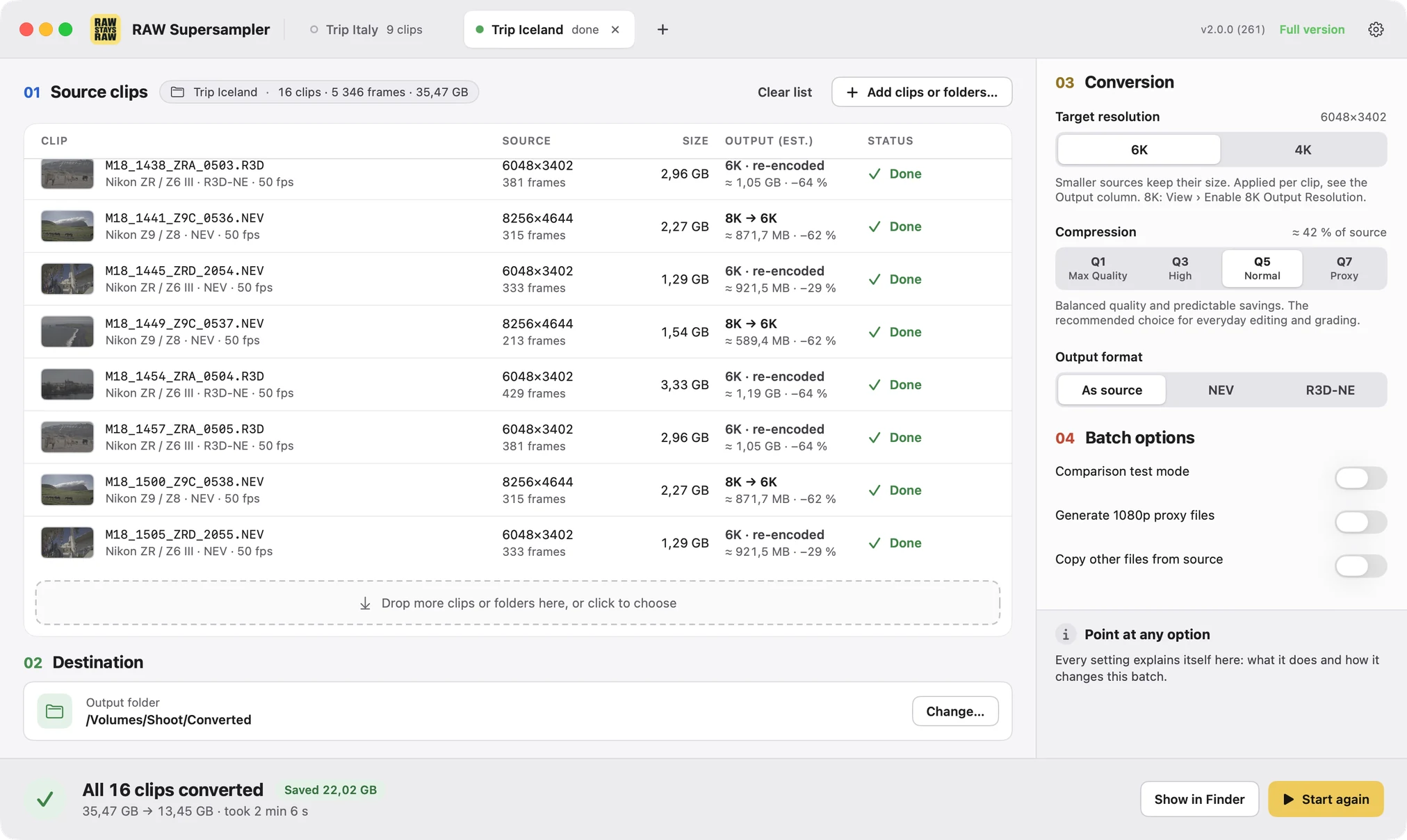
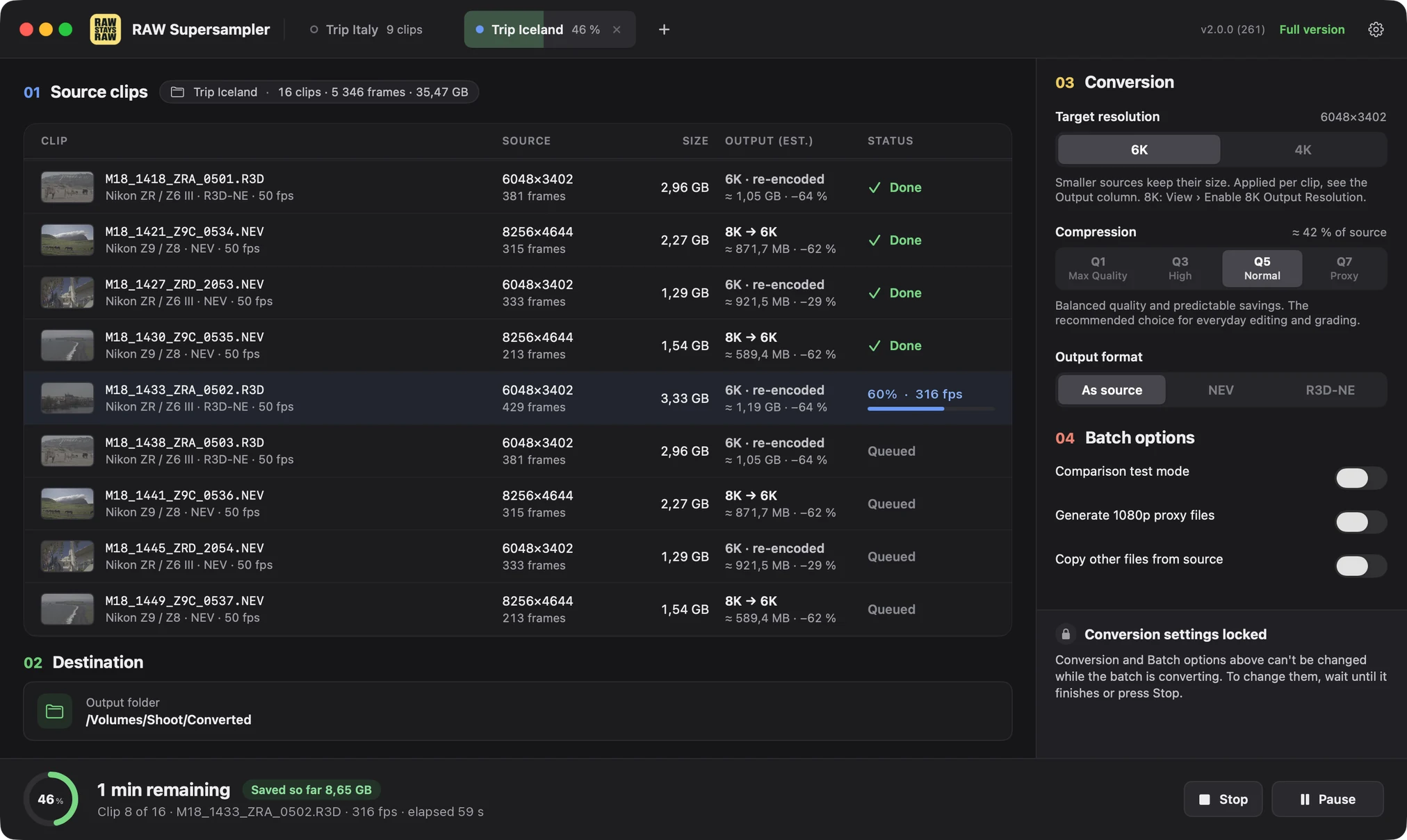
The conversion happens inside the Bayer mosaic. You get an R3D-NE or NEV clip that you debayer, expose and white-balance in your grading app like a camera original, at a lower resolution and bitrate.
Run batches from Terminal or your own scripts with the same settings as in the app, with machine-readable progress for DIT and post-production pipelines.
A small Q7 proxy next to every clip. It is still R3D-NE or NEV, so the Camera RAW panel in DaVinci Resolve keeps working while you edit.
Regression tests on real Nikon clips with every build, compared bit for bit with a reference model. Each version is also tested by hand, and we finish what we start.
The decoder, the supersampling and the encoder are our own code, written from scratch. We know what happens to every frame and can fix any part of it.
With a second output on another drive, both copies are verified before the card is safe-formatted. Until the camera formats it, it can be restored bit for bit.
Several conversion tasks in one window. Each tab has its own clips, settings and destination.
8K and 6K raw from Nikon cameras grades well, but the files are large and the camera compresses them at a constant bitrate. For small crews that means more storage, faster media and longer transfers. We wanted to keep raw, at the resolution projects are actually delivered in. Supersampler is independent software, not affiliated with or endorsed by Nikon.
Yes. RAW Supersampler is a free download from the App Store, and the trial converts your own clips with all settings, so you can check the image quality, file sizes and speed on your footage and in your editing app before you pay anything. Trial output carries a yellow SUPERSAMPLER TRIAL MODE watermark across the middle of the image. A one-time in-app purchase removes it, with no subscription.
All four levels write the same raw format with the same metadata and audio. The camera records at an inefficient constant bitrate, while Supersampler uses a variable bitrate adapted to the image content, so even a much smaller file looks visually almost the same, as our synthetic tests show. The levels differ only in how strongly the image data is compressed:
For the output resolution, we recommend 6K raw for 4K delivery and 4K raw for Full HD delivery.
The camera records at a constant bitrate, so every frame gets the same amount of data. Supersampler uses a variable bitrate, which spends data where the image needs it.
Shots with a lot of fine detail, a lot of unpredictable motion, or high ISO with heavy noise need more data, so the savings are smaller. Even in the worst cases in our tests, converted R3D-NE files were still almost 50% smaller.
The app shows the estimated output size of every clip and of the whole batch before you start the conversion.
No, usually the opposite. The camera already compresses its raw footage, just less efficiently. Supersampler keeps the same raw format (R3D-NE or NEV) and only stores the image more efficiently, so Resolve decodes the converted clips the same way as the originals.
At the same resolution, playback is about the same, and the computer reads much less data, which helps with external SSDs, card readers and NAS. At a lower resolution, every frame has fewer pixels to decode, so playback gets noticeably lighter. For slower computers, the app can also write a small Q7 proxy next to each clip.
Supersampler runs on every Apple silicon Mac with macOS 13 or later. It runs on base-model Macs too; more CPU and GPU cores make conversion faster.
Yes. Supersampler processes Bayer/CFA data without debayering and writes it back into a native R3D-NE or NEV container.
6K to 6K and 8K to 8K conversions are visually identical to the source. When you lower the resolution, the full sensor image is scaled down with a high-quality supersampling algorithm. That is different from the camera's 4K line-skip mode, which simply skips every other row and column of the sensor.
If you see artifacts in DaVinci Resolve, check its decode quality. In some configurations Resolve decodes R3D clips at half resolution by default to make playback smoother, which can show artifacts such as ringing near overexposed edges. This affects only the preview, not the final render. To turn it off, set the decode quality to Full Res Premium in the project's Camera RAW settings or in the clip's own Camera RAW settings.
Yes. Keep the source container automatically or choose R3D-NE or NEV for the output.
It preserves color metadata, Nikon lens corrections, ISO, white balance, available timecode and original PCM audio. ZR audio remains 32-bit float.
Yes. It supports recursive search, folder-structure preservation and an archival mode that copies other files unchanged and verifies the result.
After a verified Copy / Archival conversion of a whole card, RAW Supersampler can safe-format the card. Before it changes anything, it checks the output: every clip converted and every other file an identical copy. Safe format then makes the card unreadable, so the camera offers to format it. Until the card is formatted in the camera, RAW Supersampler can restore it bit for bit.
On a Mac, safe format needs the free Card Helper, because apps from the Mac App Store cannot write to memory cards directly. It only ever changes whole removable memory cards, never internal, network or fixed disks.
We welcome any feedback: bug reports, feature requests or questions about your workflow.